Page 1 of 1
Multiple graphics cards in a system
Posted: Sun Nov 30, 2025 10:23 am
by thorfdbg
How would your average PC bios/UEFI handle multiple graphics cards in the same system? Due to legacy reasons, the card(s) would need to respond to the legacy VGA IO addresses (0x3d4,0x3b4,0x3b4 and so on), such that multiple cards would react on the same port. This is obviously not working.
Some cards you need to wake up on 0x3c3, but how would the hardware know which hardware to wake up? Then, there is the VGA enable/disable register at 0x102, but this also exists for all graphics cards in parallel, and - apparently - there is the "genena" register 0x46e8, which is supposed to be used by extension (secondary) cards. But again, how would a card know whether it is the primary or the secondary card, and how would the bios know to which card to route writes to "genena" (secondary wake up) and to which card to route 0x3c3 (primary wake up)?
As soon as PCI is configured, the cards are of course "disentangled", but the mapping of the VGA registers into the PCI area (if at all) is board specific, and thus the Bios cannot possibly know how to make use of the PCI area. The VESA ROM on the card could know, but again, this should decode to the same address space at 0xc000:0000 initially, regardless whether the card is the primary or a secondary card.
Re: Multiple graphics cards in a system
Posted: Sun Nov 30, 2025 12:12 pm
by nullplan
The typical solution for most BIOSes and other firmwares is the highlander solution: There can be only one. So the firmware will pick the "boot" graphics card from the available options by some metric. Most laptops for example will exclusively boot with the internal display, while many desktop motherboards will prefer an external display. In any case, the firmware will only enable one card, and that is your boot display, until the system is booted far enough to load your own graphics drivers.
Re: Multiple graphics cards in a system
Posted: Sun Nov 30, 2025 5:21 pm
by JackScott
Adding on to that, a lot of BIOS configuration menus from the late 1990s through to the early 2010s (maybe later, I've not bothered checking) had an option to select which video card would be considered the primary display and used for booting/VGA compatibility.

Re: Multiple graphics cards in a system
Posted: Mon Dec 01, 2025 3:22 am
by thorfdbg
Yes, sure, but how does the Bios do that? This is what I wanted to know. If two graphics cards are on the PCI bus, they*both* react to the "VGA wakeup" at 0x3c3, or at GENENA at 0x46e8. So how can the Bios tell one graphics card to "shut up" and only use one of them? There is a conflict on the PCI bus on which card receives the wake up call, as they would both claim the legacy VGA registers for them.
Re: Multiple graphics cards in a system
Posted: Mon Dec 01, 2025 3:42 am
by JackScott
At machine startup, PCI devices start in a disabled state. They don't respond to I/O or memory accesses, and they cannot bus master or raise interrupts. Basically, the only thing they can do is be configured. The firmware (BIOS, UEFI, etc) scans the PCI bus, enumerates all the devices, and then uses the BAR registers to assign free memory and I/O addresses to them. It would use the PCI class/subclass to find VGA-compatible devices and only give VGA-compatible addresses to that one device (based on the priority either hardcoded or set in the BIOS configuration). At this point the devices would all be enabled, and the primary display would start responding on the VGA ports.
Sources: PCI Local Bus Specification section 6.2.2, ChatGPT.
Re: Multiple graphics cards in a system
Posted: Mon Dec 01, 2025 5:34 am
by bellezzasolo
Here's what Intel Alchemist's documentation has to say:
Intel wrote:
These registers are accessed via I/O space. The I/O space resides in the PCI compatibility hole and uses only the addresses that were part of the original VGA I/O space (which includes EGA and MDA emulation). Accesses to the VGA I/O addresses are steered to the proper bus and rely on proper setup of bridge registers. Extended VGA registers such as GR10 and GR11 use additional indexes for the already defined I/O addresses. VGA register accesses are allowed as 8 or 16 bit naturally aligned transactions only. Word transactions must have the least significant bit of the address set to zero. DWORD I/O operations should not be performed on these registers.
Some products may support access to these registers through MMIO. The access method varies and is documented elsewhere.
Re: Multiple graphics cards in a system
Posted: Mon Dec 01, 2025 6:56 am
by thorfdbg
All fine, but from this follows that the Bios (or the Os, for that matter) *cannot* configure more than one VGA compatible display device as otherwise more than one device would potentially listen to the legacy VGA registers. Does that mean that a PCI bus scan has to be refined in such sense that the device class needs to be checked, and if the class is a VGA compatible display device, the bios needs to check whether this is the only device of such type and if not so, refuse to configure it?
Re: Multiple graphics cards in a system
Posted: Mon Dec 01, 2025 8:26 am
by bellezzasolo
thorfdbg wrote: ↑Mon Dec 01, 2025 6:56 am
All fine, but from this follows that the Bios (or the Os, for that matter) *cannot* configure more than one VGA compatible display device as otherwise more than one device would potentially listen to the legacy VGA registers. Does that mean that a PCI bus scan has to be refined in such sense that the device class needs to be checked, and if the class is a VGA compatible display device, the bios needs to check whether this is the only device of such type and if not so, refuse to configure it?
I think you forget that BARs are read/write. The PCIe specification states that devices must not depend on requested I/O resources being allocated. Regardless, it's possible to map one device to the VGA area, and then map one to some unused port range (which, if it's out of range of the bridge, will never even reach the device if written).
Re: Multiple graphics cards in a system
Posted: Mon Dec 01, 2025 9:28 am
by thorfdbg
This is not about BARs at all, and that is precisely the issue. A VGA device reacts on the legacy IO space, no matter where its bars are mapped. If a VGA device can be programmed (and woken up) through one of the BAR areas, and keeps itself out of the legacy IO space after being configured, that is just wonderful. Unfortunately, not all devices are that way, and the way how the (legacy) Bios works they cannot be - to my understanding. VGA devices need to react on the CRTC, SEQ and CRTC ports, no matter how the BARs are mapped, but potentially have these registers replicated somewhere in the MMIO area (or are programmed there by completely different means, but then by an Os device driver).
The issue is that the Bios needs to be able to get a configuration dialog on the screen, and the only thing a Bios (not UEFI) can depend upon for that is the legacy VGA area - without any BARs anywhere.
Hence, the question, if the bios wakes up a VGA device by writing 1 to port 0x3c3, how does it know which graphics card will respond, given that two or more of them are in the system? So, how does bootstrapping and the Bios works in the presence of multiple cards?
Re: Multiple graphics cards in a system
Posted: Mon Dec 01, 2025 10:17 am
by bellezzasolo
thorfdbg wrote: ↑Mon Dec 01, 2025 9:28 am
This is not about BARs at all, and that is precisely the issue. A VGA device reacts on the legacy IO space, no matter where its bars are mapped. If a VGA device can be programmed (and woken up) through one of the BAR areas, and keeps itself out of the legacy IO space after being configured, that is just wonderful. Unfortunately, not all devices are that way, and the way how the (legacy) Bios works they cannot be - to my understanding. VGA devices need to react on the CRTC, SEQ and CRTC ports, no matter how the BARs are mapped, but potentially have these registers replicated somewhere in the MMIO area (or are programmed there by completely different means, but then by an Os device driver).
The issue is that the Bios needs to be able to get a configuration dialog on the screen, and the only thing a Bios (not UEFI) can depend upon for that is the legacy VGA area - without any BARs anywhere.
Hence, the question, if the bios wakes up a VGA device by writing 1 to port 0x3c3, how does it know which graphics card will respond, given that two or more of them are in the system? So, how does bootstrapping and the Bios works in the presence of multiple cards?
However, the PCI bus has a command register, which includes a bit that enables or disables I/O space writes.
For instance:
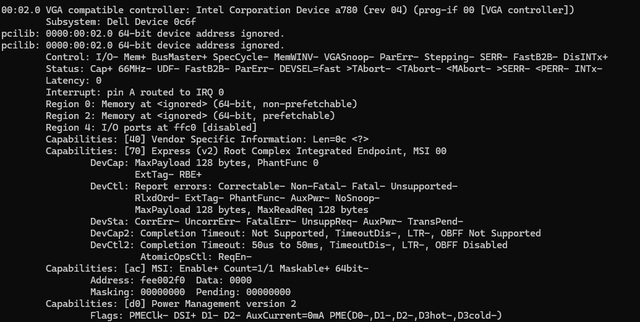
Note how I/O is set off.
Also note that legacy BIOS, and in fact UEFI too, has an option to load an option ROM from the graphics card itself.
Re: Multiple graphics cards in a system
Posted: Mon Dec 01, 2025 1:57 pm
by thorfdbg
Ok, so this means that the Bios needs to turn off the IO space of all VGA like devices, except the selected one, then work from this device.
Re: Multiple graphics cards in a system
Posted: Tue Dec 02, 2025 4:57 am
by bellezzasolo
thorfdbg wrote: ↑Mon Dec 01, 2025 1:57 pm
Ok, so this means that the Bios needs to turn off the IO space of all VGA like devices, except the selected one, then work from this device.
In effect, yes. PCIe devices must be operable without I/O space anyway, so it's a totally functional configuration.
UEFI can provide a GOP protocol for each screen (Limine can give you frame buffers for all screens), and I don't see anything that precludes multiple adapters being fully initialised by firmware.
Also, just to further expand, you implied that BIOS uses the VGA registers, as it's the only common interface. No self-respecting BIOS uses VGA registers, you can't use the VGA registers for setting high resolutions anyway.
PCI has a configuration register for Expansion ROMs, and that's how firmware gets a basic video driver for any graphics card - it's provided on the card itself. 14.4.21 of the UEFI specification provides more detail.
Re: Multiple graphics cards in a system
Posted: Tue Dec 02, 2025 5:15 am
by thorfdbg
UEFI is another story. That's a graphical screen, but I was really talking about "plain old bios", and from what I see, I would expect that this is a text mode and that would work through the VGA legacy register set. Sure, one would consider that it is configured through the boot ROM of the card, but that opens up just a follow-up question: How is that ROM mapped? For PCI, it is the ROM configuration space, but is the Bios already using that? Or instead, the VESA bios at c000:0000? And finally, who maps the VESA Bios there and how?
Re: Multiple graphics cards in a system
Posted: Tue Dec 02, 2025 8:12 am
by bellezzasolo
thorfdbg wrote: ↑Tue Dec 02, 2025 5:15 am
UEFI is another story. That's a graphical screen, but I was really talking about "plain old bios", and from what I see, I would expect that this is a text mode and that would work through the VGA legacy register set. Sure, one would consider that it is configured through the boot ROM of the card, but that opens up just a follow-up question: How is that ROM mapped? For PCI, it is the ROM configuration space, but is the Bios already using that? Or instead, the VESA bios at c000:0000? And finally, who maps the VESA Bios there and how?
There's a lot of commonality, and The UEFI specification is easy to access, referencing legacy option ROMs too (the details are defined in the PCI Firmware Spec).
I believe it is the Firmware that maps the PCI ROM address, much like other BARs.
However, for a worked example? This is what Coreboot does.
https://github.com/coreboot/coreboot/bl ... _rom.c#L73
Code: Select all
if (rom_header) {
		printk(BIOS_DEBUG, "In CBFS, ROM address for %s = %p\n",
		       dev_path(dev), rom_header);
	} else if (CONFIG(ON_DEVICE_ROM_LOAD)) {
		uintptr_t rom_address;

		rom_address = pci_read_config32(dev, PCI_ROM_ADDRESS);

		if (rom_address == 0x00000000 || rom_address == 0xffffffff) {
			if (CONFIG(CPU_QEMU_X86) && (dev->class >> 8) == PCI_CLASS_DISPLAY_VGA)
				rom_address = 0xc0000;
			else
				return NULL;
		} else {
			/* Enable expansion ROM address decoding. */
			pci_write_config32(dev, PCI_ROM_ADDRESS,
					   rom_address|PCI_ROM_ADDRESS_ENABLE);
		}

		rom_address &= PCI_ROM_ADDRESS_MASK;

		printk(BIOS_DEBUG, "Option ROM address for %s = %lx\n",
		       dev_path(dev), (unsigned long)rom_address);
		rom_header = (struct rom_header *)rom_address;
	} else {
		printk(BIOS_DEBUG, "PCI Option ROM loading disabled for %s\n",
		       dev_path(dev));
		return NULL;
	}
Re: Multiple graphics cards in a system
Posted: Tue Dec 02, 2025 10:07 am
by Gigasoft
PCI graphics cards start with the VGA interface disabled. The on board ROM is responsible for configuring it for VGA operation and setting up its int 10h handler. This is accessed through the Expansion ROM BAR at offset 30h, and contains boot images for various platforms. In the case of BIOS, the images are loaded into the 0c0000h-0e0000h area and executed. If multiple VGA devices are present as indicated by the PCI class code, the BIOS will initialize only one device and skip the rest, I suppose. An UEFI boot image, on the other hand, will not configure the card for VGA operation, so there is no possible conflict.